Checklist
What should a Microsoft 365 hardening baseline include?
CISA wrote its SCuBA baselines for federal tenants, but the settings fit most small and mid-sized organizations. This checklist turns them into a working baseline and is clear about which controls need extra licenses.
The short answer
A sound Microsoft 365 baseline blocks legacy authentication, requires MFA for everyone and phishing-resistant MFA for admins, keeps two to eight Global Administrators, enforces SPF, DKIM and DMARC at p=reject, disables external auto-forwarding, applies Defender preset policies, keeps unified audit logging on, and limits external sharing. CISA's SCuBA baselines and its free ScubaGear tool give you a published standard to check against.
Key takeaways
- CISA's SCuBA baselines are a free, public, policy-by-policy standard for Microsoft 365, and ScubaGear checks a tenant against them automatically.
- Identity controls come first: block legacy authentication, require MFA for all users, and use phishing-resistant MFA for privileged roles.
- Tenants without Entra ID P1 should turn on security defaults; Conditional Access requires at least P1, and PIM-based controls require P2 or a third-party PAM tool.
- Email hardening means SPF, DKIM, DMARC moving to p=reject, no automatic forwarding to external domains, and Defender for Office 365 preset policies.
- Microsoft renames settings and moves menus often, so confirm each item against current Microsoft Learn documentation before you change anything.
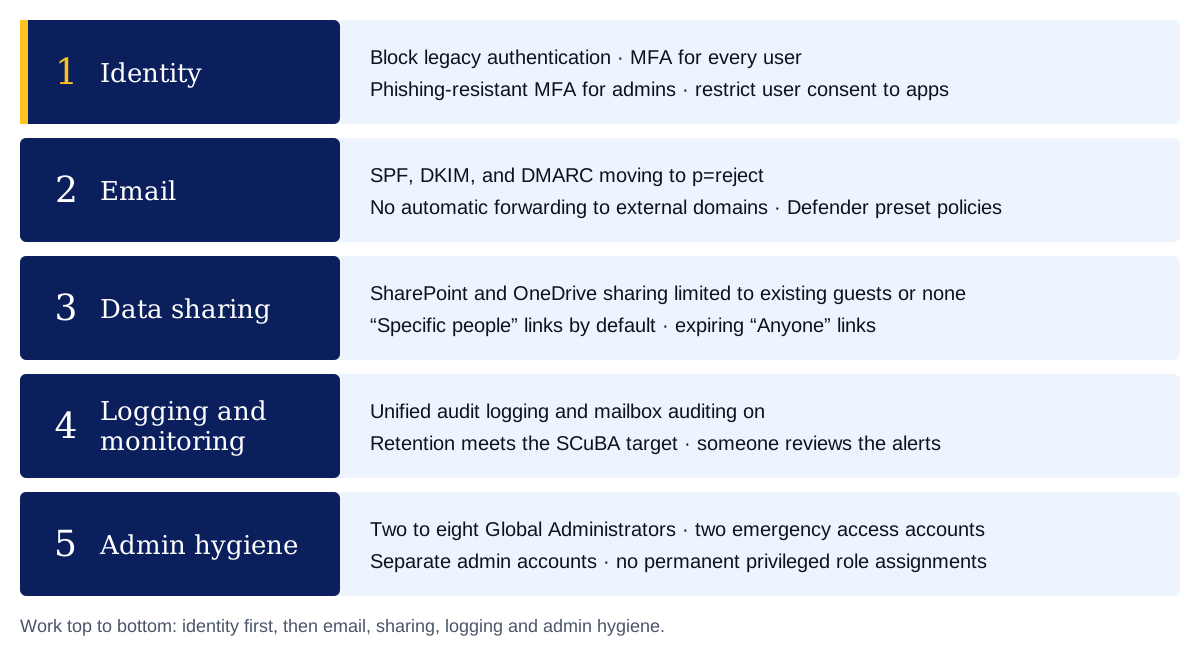
A Microsoft 365 hardening baseline should cover five areas: identity, email, data sharing, logging, and admin hygiene. The core settings are well established. Block legacy authentication. Require MFA for every user and phishing-resistant MFA for administrators. Keep between two and eight Global Administrators. Publish SPF, DKIM, and DMARC, and move DMARC to p=reject. Turn off automatic forwarding to external domains. Apply Defender for Office 365 preset policies. Keep unified audit logging on and retained. Restrict external sharing and user consent to apps.
You do not need to invent this list. CISA's Secure Cloud Business Applications (SCuBA) project publishes secure configuration baselines for Microsoft 365. It also publishes ScubaGear, a free, open-source PowerShell tool that checks a tenant against those baselines. ScubaGear covers Entra ID, Exchange Online, the Defender security suite, SharePoint and OneDrive, Teams, Power Platform, and Power BI. It produces HTML, JSON, and CSV reports.
For federal agencies, these baselines are mandatory. CISA Binding Operational Directive 25-01, issued December 17, 2024, requires agencies to deploy ScubaGear on in-scope tenants and implement the mandatory SCuBA policies. For private organizations, the directive does not apply. The baselines are still a sound, public reference point that an auditor or customer will recognize.
Which controls depend on your license tier?
Several controls depend on what you pay for. The SCuBA baselines assume at least Microsoft 365 E3 and call out anything beyond that.
| Capability | License needed | If you don't have it |
|---|---|---|
| Security defaults | None (free tier) | Turn them on |
| Conditional Access | Entra ID P1 or higher | Use security defaults instead |
| Risk-based sign-in and user blocking | Entra ID P2 | Rely on MFA and legacy auth blocking |
| Privileged Identity Management (PIM) | Entra ID P2, or a third-party PAM tool | Keep admin counts low and review roles manually |
| Safe Links, Safe Attachments, impersonation protection | Defender for Office 365 Plan 1 or 2 | Use built-in Exchange Online Protection settings |
| Audit retention beyond 180 days | Office 365 E5 or an audit add-on | Export logs to a separate store |
Microsoft's security defaults guidance is direct about the split. Security defaults suit organizations on the free tier of Entra ID. Organizations with P1 or P2 should use Conditional Access instead, and must turn security defaults off to do so.
Identity
Identity comes first, because most other controls assume the person signing in is who they claim to be.
- Block legacy authentication (SCuBA MS.AAD.1.1v1). Legacy protocols cannot do MFA, so an attacker can use them to bypass it. Microsoft's Conditional Access guidance recommends starting the policy in report-only mode, then switching it on. Security defaults also block legacy authentication.
- Require MFA for all users (MS.AAD.3.2v2). SCuBA's target is phishing-resistant MFA for everyone (MS.AAD.3.1v1). For most smaller firms, that is a staged goal rather than a first step.
- Require phishing-resistant MFA for highly privileged roles (MS.AAD.3.6v1). Admins go first, because their accounts do the most damage when compromised.
- Use Conditional Access if you have P1. Build policies for legacy auth, MFA, and admin access. Exclude your emergency access accounts so a misconfigured policy cannot lock everyone out.
- Block high-risk users and sign-ins (MS.AAD.2.1v1, 2.3v1). These require Entra ID P2.
- Restrict user consent to applications (MS.AAD.5.2v1). Unrestricted consent lets any user grant a third-party app access to company data.
Email settings protect your domain from spoofing and your data from quiet exfiltration.
- Publish SPF for each domain, failing non-approved senders (MS.EXO.2.2v3).
- Enable DKIM for all domains (MS.EXO.3.1v1, a "should" in SCuBA).
- Publish DMARC for every second-level domain (MS.EXO.4.1v1) and set it to
p=reject(MS.EXO.4.2v1). Microsoft's DMARC setup guide recommends getting there in stages:p=none, thenp=quarantine, thenp=reject, reading aggregate reports at each step. Parked domains that send no mail can go straight top=reject. - Disable automatic forwarding to external domains (MS.EXO.1.1v2). CISA's rationale is that adversaries use automatic forwarding to keep persistent access to a victim's email.
- Disable SMTP AUTH (MS.EXO.5.1v1) unless a specific device needs it, and document the exception.
- Add external sender warnings (MS.EXO.7.1v1).
- Apply Standard or Strict preset security policies in Defender. Microsoft's preset policy documentation describes them as Microsoft-recommended settings that are mostly not configurable. The SCuBA Security Suite baseline accepts either preset for its core policies.
- Confirm Safe Links and Safe Attachments coverage if you have Defender for Office 365. Users outside the Standard and Strict presets still receive the Built-in protection preset unless excluded.
Data sharing
SharePoint and OneDrive defaults often allow wider sharing than a firm intends.
| Setting | SCuBA baseline | Policy ID |
|---|---|---|
| SharePoint external sharing | "Existing guests" or "Only people in your organization" | MS.SHAREPOINT.1.1v1 |
| OneDrive external sharing | "Existing guests" or "Only people in your organization" | MS.SHAREPOINT.1.2v1 |
| Default link scope | "Specific people" | MS.SHAREPOINT.2.1v1 |
| Default link permission | View only | MS.SHAREPOINT.2.2v1 |
| "Anyone" link expiry, if allowed | 30 days or less | MS.SHAREPOINT.3.1v1 |
| Verification-code reauthentication | 30 days or less | MS.SHAREPOINT.3.3v2 |
If your business needs to share with new external parties, limit sharing to approved external domains (MS.SHAREPOINT.1.3v1) instead of opening sharing to anyone.
Logging and monitoring
You cannot investigate an incident you have no record of.
- Confirm unified audit logging is on (MS.SECURITYSUITE.5.1v1).
- Confirm mailbox auditing is on (MS.EXO.13.1v1).
- Meet the SCuBA retention target: audit logs searchable for at least 3 months and retrievable for at least 12 months (MS.SECURITYSUITE.5.2v1). The baseline notes that Microsoft keeps audit logs for 180 days by default. Longer retention in Microsoft 365 requires E5 or an add-on, so smaller firms often export logs elsewhere.
- Assign someone to review alerts and sign-in logs. Logging without review only helps after the fact. This is where managed security monitoring earns its place.
Admin hygiene
- Keep between two and eight Global Administrators (MS.AAD.7.1v1). CISA notes that Microsoft recommends fewer than five, and that extra accounts up to eight may be needed for emergency access.
- Create two cloud-only emergency access accounts, as Microsoft recommends, and exclude them from Conditional Access policies.
- Use separate admin accounts for administration, distinct from daily email and browsing accounts.
- Remove permanent assignments to highly privileged roles (MS.AAD.7.4v1) and require approval to activate Global Administrator (MS.AAD.7.6v1). These PIM-based controls need Entra ID P2 or a third-party PAM tool.
- Alert on privileged role assignments and activations (MS.AAD.7.7v1, 7.8v1).
- Run ScubaGear on a schedule and after major changes, then track each failed policy to a fix or a documented exception.
How should you use this checklist?
Run ScubaGear first to see where your tenant stands. Fix identity gaps before anything else. Then work through email, sharing, and logging. Record any setting you deliberately leave off, with the business reason, so the next review starts from a known position.
Our cloud security reviews follow this sequence for Microsoft 365 tenants. If you want a second set of eyes on your results, get in touch.
Sources
Last reviewed . Rules and guidance change, so confirm details against the sources below. General guidance, not legal advice.
- Secure Cloud Business Applications (SCuBA) Project, CISA
- BOD 25-01: Implementation Guidance for Implementing Secure Practices for Cloud Services, CISA, 2024-12-17
- ScubaGear: Automation to assess the state of your M365 tenant against CISA's baselines, CISA (GitHub, cisagov)
- CISA M365 Secure Configuration Baseline for Microsoft Entra ID, CISA (GitHub, cisagov/ScubaGear)
- CISA M365 Secure Configuration Baseline for Exchange Online, CISA (GitHub, cisagov/ScubaGear)
- CISA M365 Secure Configuration Security Suite Baseline, CISA (GitHub, cisagov/ScubaGear)
- CISA M365 Secure Configuration Baseline for SharePoint Online and OneDrive, CISA (GitHub, cisagov/ScubaGear)
- Configure Security Defaults for Microsoft Entra ID, Microsoft Learn, 2025-07-21
- Block legacy authentication with Conditional Access, Microsoft Learn, 2026-03-24
- Preset security policies, Microsoft Learn, 2026-07-03
- Set up DMARC to validate email in Microsoft 365, Microsoft Learn, 2026-07-03
Next step
Get a second set of eyes on your tenant
Our cloud security reviews check your Microsoft 365 tenant against this baseline, explain each failed policy in plain terms and give you a fix order that fits your licenses.