Guide
How do you stop business email compromise and invoice fraud?
Business email compromise rarely needs malware. It needs one convincing email and one person who acts on it, so the controls that matter most sit in your payment process as well as your mail system.
The short answer
Stop business email compromise with three layers. Verify every payment or bank-detail change by calling a number already on file, and require a second approver. Protect mailboxes with MFA, DMARC, impersonation protection, blocked external auto-forwarding and alerts on new inbox rules. Train finance and payroll staff on payment-change red flags. If money was sent, call your bank to request a recall and file at ic3.gov immediately.
Key takeaways
- The FBI describes business email compromise as compromising email accounts and other channels, such as phone numbers and virtual meetings, to conduct unauthorized transfers of funds.
- Email filters cannot catch every case: a lookalike domain with valid DNS records, or a real mailbox that has been taken over, can pass SPF, DKIM and DMARC.
- The control that stops most payment fraud is procedural: confirm any change to payment details through a number already on file, never through the email that asked for it, and require a second approver.
- Technical controls narrow the openings: MFA, DMARC at reject, impersonation protection, blocked external auto-forwarding and alerts on suspicious inbox rules.
- If money was sent, time matters: the FBI advises contacting your financial institution immediately to request a recall and filing a complaint at ic3.gov, whatever the amount.
Business email compromise is fraud that runs through ordinary business conversations. A criminal impersonates, or takes over, the mailbox of someone you trust, such as a supplier, an executive or a closing attorney, and asks for money to go somewhere new. No malware is involved, and the email often looks routine. Stopping it takes controls in three places: your payment process, your email system and your people.
How does business email compromise work?
The FBI's Internet Crime Complaint Center (IC3) defines business email compromise (BEC) as a scam targeting businesses or individuals working with suppliers or regularly making wire transfer payments. It is carried out by compromising email accounts and other forms of communication, such as phone numbers and virtual meeting applications, through social engineering or computer intrusion, to conduct unauthorized transfers of funds (IC3).
In its 2025 annual report, the IC3 states that investment fraud was again the largest component of reported losses, followed by business email compromise and tech support scams. BEC is not a new or niche problem. It is one of the largest categories of loss the FBI sees.
The common patterns:
- Vendor invoice fraud. A supplier's mailbox is compromised, or imitated, and an invoice arrives with new bank details. The amount and timing look normal because the criminal has read the real correspondence.
- Payment change requests. A message asks you to update the account on file for a regular payee before the next payment run.
- Executive impersonation. An email that appears to come from a senior leader asks finance staff to make an urgent, confidential transfer. The IC3 notes that chat generators can quickly produce official-sounding emails mimicking a company's CEO, and that voice cloning can be used to request wire payments.
- Compromised mailboxes and hidden rules. After taking over a real account, attackers often create inbox rules that hide, delete or forward messages so the account owner does not see the conversation. Microsoft notes that malicious inbox rules are common during BEC campaigns, sometimes keyed to words such as "invoice" (Microsoft Learn).
- Lookalike domains. The sender address differs from the real one by a character or a top-level domain. The IC3 advises checking that links and addresses match the business they claim to come from and watching for misspelled domain names (IC3).
- Payroll diversion. HR or payroll staff receive a spoofed email from an "employee" asking to change direct deposit details for the current pay period. The IC3 has described cases where the new account led to a prepaid card, and where phishing for employee credentials came first to make the request look genuine (IC3).
- Real estate closing fraud. Buyers expecting to wire closing funds receive instructions from someone impersonating the title company or their attorney. The IC3's 2025 report describes both patterns in cases its Recovery Asset Team handled.
Why don't email filters catch every attempt?
Email security matters, and we cover it below. It cannot be the only control, for two reasons.
First, impersonation does not always fail authentication. Microsoft explains that a lookalike domain can pass SPF, DKIM and DMARC if the attacker registered it and published valid DNS records (Microsoft Learn). The message is authenticated; it is simply from the wrong company.
Second, a compromised mailbox sends real mail. When a supplier's account has been taken over, the fraudulent invoice comes from the supplier's genuine domain, in an existing thread, with correct signatures. No filter can tell that the person typing is not the account owner.
That is why the most reliable control for payment fraud sits outside the inbox, in the way your organization approves a change to where money goes.
What process controls stop a fraudulent payment?
Treat any request to change payment details as unverified until it has been confirmed by a channel the requester did not choose. The IC3's recommended prevention tips start here: use secondary channels or two-factor authentication to verify requests for changes in account information (IC3).
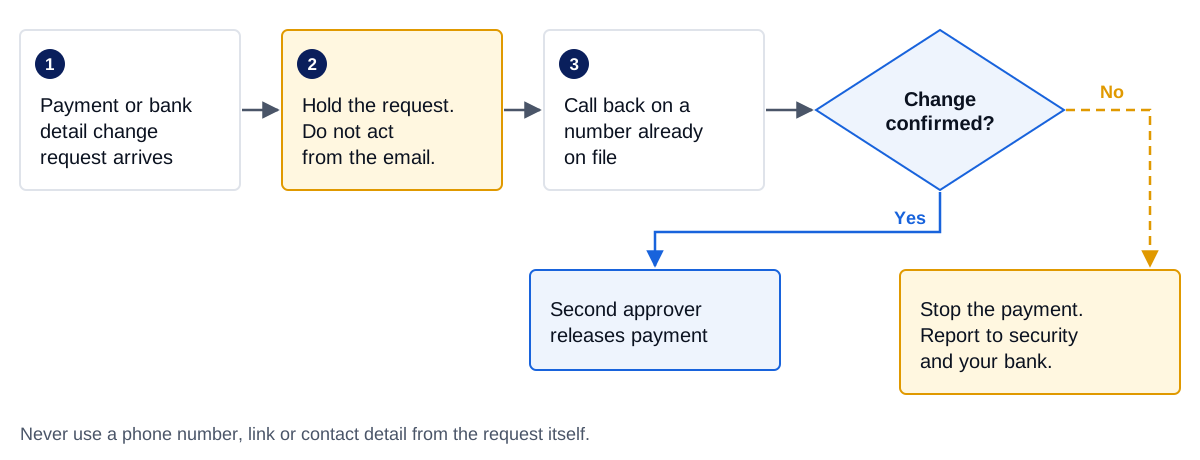
In practice, that flow means four rules, written into your finance procedures:
- Hold every change. A request to pay a new account, or to change the bank details of an existing payee, is held. Nobody acts on it from the email, however urgent it sounds.
- Call back on a number already on file. Use the phone number in your vendor master file or a contract, never one in the email, its signature or an attachment. If the message came from a compromised account, any contact details in it lead back to the criminal.
- Require a second approver. A different person releases the payment after the callback is recorded. Dual approval means one convincing email cannot move money on its own.
- Stop and report anything unconfirmed. If the payee cannot confirm the change, the payment does not go, and the request goes to whoever handles security, plus your bank if any money has already moved.
Apply the same rule to changes that do not look like payments: new direct deposit details for an employee, updated wiring instructions for a closing, or a supplier's "new remittance address". For payroll, require employees to change bank details themselves through an MFA-protected self-service portal, rather than accepting changes by email.
Which technical controls matter most?
Technical controls reduce the number of fraudulent messages that reach staff, and make it harder for criminals to take over a mailbox and hide in it. These are the ones we prioritize.
| Control | What it stops | Notes |
|---|---|---|
| MFA on every mailbox | Takeover with a phished or reused password | CISA advises phishing-resistant MFA where possible, starting with administrators and people who handle sensitive data |
DMARC at p=reject for your domains |
Criminals sending mail that claims to be from your exact domain | CISA, NSA, FBI and MS-ISAC recommend reject for sent mail and DMARC checks on received mail |
| Impersonation protection | Lookalike domains and display-name impersonation of executives and key suppliers | In Microsoft 365, requires Defender for Office 365 and must be configured; no protected users or domains are set by default |
| First contact and unauthenticated sender indicators | Staff missing that a sender is new or failed authentication | Available to all Microsoft 365 cloud mailboxes; Microsoft recommends turning the first contact safety tip on |
| Block automatic external forwarding | Silent copying of a compromised mailbox to an outside address | Set the outbound policy explicitly to off rather than leaving the system-controlled default |
| Alerts on new inbox rules | Rules that hide, delete or forward messages after a takeover | Someone must review the alert, remove malicious rules and reset credentials |
MFA. A phished or reused password is a common way into a mailbox. CISA says strong passwords are no longer enough on their own and that phishing-resistant MFA is the strongest option, with text and email codes the weakest (CISA). The joint phishing guidance asks organizations to prioritize phishing-resistant MFA for administrators and for accounts with broad access to customer or financial data, which describes most finance teams (CISA).
DMARC. The same guidance recommends enabling DMARC for received email and setting DMARC to reject for sent email, so that spoofed messages using your domain are rejected before delivery. Microsoft documents the setup for Microsoft 365 domains (Microsoft Learn). DMARC protects your exact domain; it does nothing about lookalikes, which is why the next control matters.
Impersonation protection. In Microsoft 365, user and domain impersonation protection, mailbox intelligence and impersonation safety tips are available only in Defender for Office 365. Microsoft notes that, by default, no sender addresses or domains are configured for impersonation protection (Microsoft Learn). Add your executives, your finance contacts, your own domains and your key suppliers' domains.
Forwarding and inbox rules. Microsoft's outbound policy has three settings for automatic external forwarding. Because the system-controlled default can behave differently between organizations, Microsoft advises choosing on or off explicitly (Microsoft Learn). Turn it off and allow exceptions only where there is a business need. Then make sure alerts on suspicious inbox rules reach someone who will act on them.
Our Microsoft 365 hardening baseline covers these settings in more detail alongside the rest of a tenant baseline.
How do you train staff to spot payment-change fraud?
The FTC's small business guidance pairs email authentication with staff training on phishing (FTC). For BEC, generic phishing training is not enough. Focus on the people who can move money or change where it goes: accounts payable, payroll, HR, executive assistants, and anyone who handles closings or client funds.
Teach them to stop at these signs:
- A request to change bank details, pay a new account or update direct deposit information.
- Pressure to act quickly, keep the request confidential, or bypass the usual approval.
- A sender address that does not exactly match the known contact, especially on a phone, where full addresses are often hidden. The IC3 specifically advises checking the sender's address on mobile devices.
- A first contact safety tip or an unauthenticated sender indicator on a message from someone who is supposedly familiar.
- A voice call or video meeting that pushes the same request. The IC3 now includes phone numbers and virtual meeting applications in its definition of BEC, so a call that matches the email is not proof on its own.
Make the safe behavior easy. Staff should know that holding a payment to call back is always acceptable, including when the request appears to come from the chief executive, and that nobody will be criticized for it.
What should you do in the first hours if money was sent?
The IC3's guidance is direct: if you discover a fraudulent transfer, time is of the essence (IC3).
- Call your bank immediately. Contact your financial institution and request a recall of the funds, along with any indemnification documents it needs. The IC3 notes that institutions have different policies, so know in advance what yours will do.
- File a complaint at ic3.gov. Do this regardless of the amount, with the full transaction details. The IC3's Recovery Asset Team works with financial institutions to try to freeze funds through its Financial Fraud Kill Chain process. Recovery is not certain, and delay reduces the chance of it.
- Secure the mailbox. If an account was compromised, Microsoft's playbook is to disable malicious inbox rules, reset the account's credentials, look for other activity by that account and check for other suspicious sign-ins from the same source (Microsoft Learn).
- Preserve evidence. Keep the fraudulent emails with their full headers, the payment records and the mailbox audit logs. Do not delete messages or accounts while you investigate.
- Warn the people involved. If criminals impersonated your business, the FTC advises telling customers as soon as possible, by an email without hyperlinks or another channel, and reporting the scam to the IC3, the FTC at ReportFraud.ftc.gov and local law enforcement (FTC).
- Check your other obligations. Contact your insurer if you have cyber or crime coverage, and ask counsel whether customer data was exposed in the compromised mailbox. Covered financial institutions should also consider the FTC Safeguards Rule notification duty.
Where to start
Begin with the controls that need no new tools:
| Step | Owner | Evidence to keep |
|---|---|---|
| Written callback rule for any payment or bank-detail change | Finance lead | Procedure; callback log |
| Second approver for new payees and changed details | Finance lead | Approval records |
| Payroll changes only through an MFA-protected portal | HR or payroll | Portal settings; change history |
| MFA on every mailbox, phishing-resistant for finance and admins | IT provider | MFA enforcement report |
| DMARC moving to reject on every domain you own | IT provider | DNS records; DMARC reports |
| Impersonation protection for executives, finance and key suppliers | Email security | Policy configuration |
| External auto-forwarding off; inbox rule alerts reviewed | Email security | Outbound policy; alert records |
| Bank contact and recall steps written down before you need them | Finance lead | Incident contact sheet |
Our managed security service covers the email side for Microsoft 365 and Google Workspace: we configure impersonation and authentication protections, watch forwarding and inbox rule activity, and respond to suspected account takeovers, working alongside your IT provider. Our advisory team can help you write payment verification procedures that finance staff will actually follow.
Firms that handle closings or client funds can read our notes for real estate and title companies and law firms. If you want a second view of how your payment approvals and mailboxes would hold up, talk to us.
Sources
Last reviewed . Rules and guidance change, so confirm details against the sources below. General guidance, not legal advice.
- 2025 IC3 Annual Report, FBI Internet Crime Complaint Center (IC3), 2026
- Business Email Compromise: The $55 Billion Scam (Alert I-091124-PSA), FBI Internet Crime Complaint Center (IC3), 2024-09-11
- Business Email Compromise: The $26 Billion Scam (Alert I-091019-PSA), FBI Internet Crime Complaint Center (IC3), 2019-09-10
- Phishing Guidance: Stopping the Attack Cycle at Phase One, CISA, NSA, FBI and MS-ISAC, 2023-10-18
- Require Multifactor Authentication, CISA
- Cybersecurity for Small Business: Business Email Imposters, Federal Trade Commission
- Anti-phishing policies in Microsoft 365, Microsoft Learn, 2026-08-20
- Control external email forwarding and fix 5.7.520 errors, Microsoft Learn, 2026-08-18
- Alert classification for suspicious inbox manipulation rules, Microsoft Learn, 2026-07-02
- Set up DMARC to validate email in Microsoft 365, Microsoft Learn
Next step
Close the email openings that payment fraud depends on
Our managed email security covers Microsoft 365 and Google Workspace: impersonation protection, authentication checks, forwarding controls and alerts on suspicious mailbox rules, run alongside your IT provider.